So, you’re ready to scale your established direct-to-consumer (DTC) brand by launching your own TikTok Shop? Between lower customer acquisition potential, faster product discovery, and real-time consumer insights, selling on TikTok Shop can be a smart move for many businesses looking for rapid customer feedback, increased brand visibility, and a boost in revenue.
Before selling on the social-commerce platform, brands have to undergo a rigorous onboarding process and get approved. Read on for step-by-step onboarding guidance, plus how to speed up the approval process and what to do if your application gets denied.
Table of Contents
Step 1: Create Your TikTok Shop Seller Account
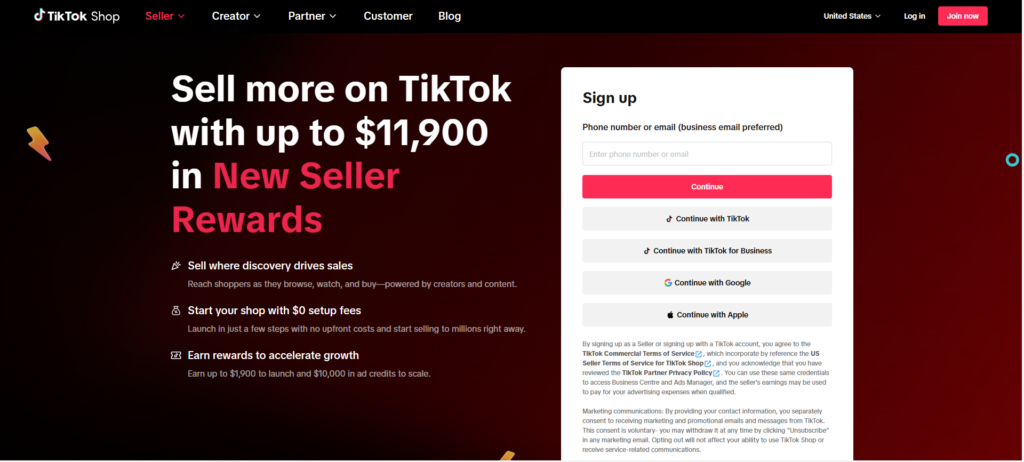
First things first: creating your seller account from the TikTok Shop Seller Center. You can either log in with an existing TikTok account or sign up for one with your email or phone number.
From there, select your business type: individual seller or registered business/company. In most cases, large DTC brands will opt for the second option.
Step 2: Verify Your Identity
Prospective sellers will, then, have to undergo an identification verification process. Their identity can be verified by providing information like a government-issued ID, business registration documents, EIN/tax information if applicable, and bank account information.
The verification process will differ slightly depending on whether you selected to sell as an individual seller or as a registered business/company.
Step 3: Provide Detailed Business Information
Next, TikTok will ask you to provide further information about your business. This information includes your legal business name, registered business address, email, and phone number.
It’s important that your business’s information remains consistent across all documents and platforms. For instance, if the address on your tax documents doesn’t match the one you provide to TikTok, this could create a roadblock in getting approved to sell on TikTok Shop.
Step 4: Set Up Your Shop Information
After providing detailed business information, it’s time to begin setting up your shop. This includes adding your store name, logo, product categories, warehouse or shipping information, and return address.
Step 5: Connect Your eCommerce Store
While TikTok Shop allows businesses to manually add products one by one, this doesn’t work for large DTC brands, which is why the platform also gives the option for brands to integrate their existing shop with TikTok Shop. TikTok allows for integration with third parties such as Shopify, WooCommerce, BigCommerce, and more.
Connecting your eCommerce store to your TikTok Shop can seamlessly sync your existing inventory, pricing, and in some cases, your performance tracking to help unify sales across multiple channels.
Step 6: Review TikTok Shop’s Compliance Rules (And Keep Your Eyes Peeled for Policy Updates)
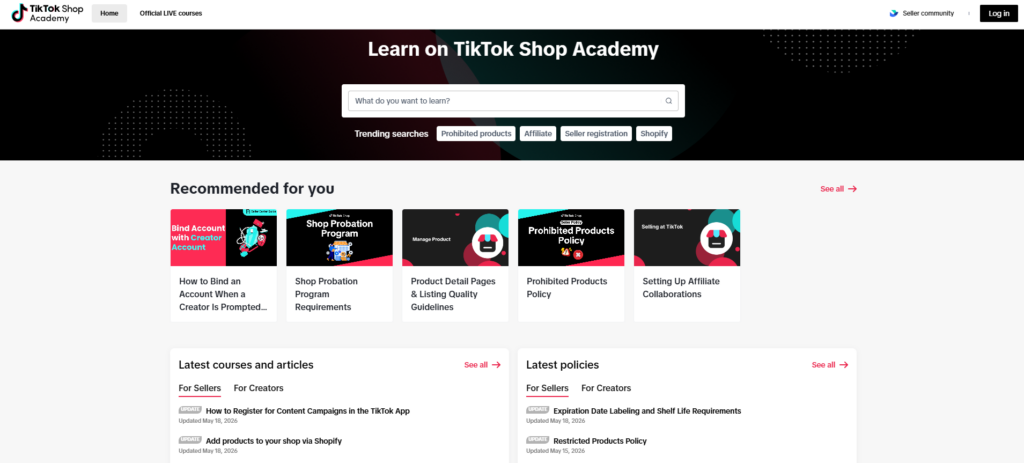
Before officially launching your store (after receiving the green light from TikTok), it’s important to review TikTok Shop’s policies. This can be done from the TikTok Shop Academy.
The Academy features courses, guides, and articles to help you become familiar with TikTok Shop’s various rules and requirements for sellers. TikTok also posts regular policy updates on the Academy, making it easy for existing merchants to stay compliant.
Step 7: Implement Order Fulfillment and Support Systems
The bigger the brand, the more important it is to have a strong backend infrastructure in place for handling orders and managing customer issues.
TikTok demand can be unpredictable, support tickets may spike during busy selling periods, and TikTok expects strong operational performance from its sellers. That said, implementing a solid order fulfillment and support system before launching your store is an absolute must (and can save you from some serious headaches later).
Step 8: Launch Affiliate/Creator Programs
Want to scale as quickly as possible on TikTok’s eCommerce platform? Enable the TikTok Shop Affiliate Program to turn seasoned creators into a sales team for your brand.
After enabling the Affiliate Program feature, brands can set commission rates for products, list products in the Affiliate Marketplace, and allow eligible creators to pick one of their products and automatically earn commission in exchange for content generation. Brands may, instead, manually invite creators of their choice and send free products or samples to in return for content.
Step 9: Maintain a Strong Account Standing
Once you get approved to sell on TikTok Shop and officially launch your store, the work doesn’t stop there. TikTok requires active sellers to remain compliant with its rules. Otherwise, your eligibility to continue selling on the platform could become temporarily or permanently compromised.
TikTok sellers can maintain a strong account standing by meeting TikTok’s handling/shipping deadlines, keeping cancellation and refund rates low, responding promptly to customers, keeping inventory stock accurate, and maintaining high order satisfaction. Sellers must also keep from using copyrighted material, avoid selling prohibited items, and refrain from making misleading claims or fake reviews.
How Long Does it Take to Get Approved on TikTok Shop?
TikTok Shop applications are typically reviewed in under a week. Most brands get approved within 24 to 72 hours, but in the U.S., waiting up to five business days isn’t uncommon.
How to Avoid Delays in Getting Approved
The key to getting approved quickly and avoiding unnecessary delays is to ensure your application is filled out correctly, that all business information matches, and uploaded business registration documents are clear.
When documents are unclear or missing, information is mismatched, one’s identity can’t be verified, or the brand is applying to sell high-risk product categories, there may be a delay in getting approved.
What To Do if Your TikTok Shop Application Gets Denied
If your TikTok Shop application gets rejected, not all hope is lost. There are still opportunities to fix your application or reapply.
After being denied, read TikTok’s reasoning. Documentation may be incomplete, your identity may not be verifiable, or a policy risk might be detected. Revise accordingly.
Before resubmitting your application, ensure your business information matches across all documents, all necessary documentation has been uploaded (and isn’t blurry, missing pages, or expired), and that your brand appears credible (e.g., quality website, consistent branding, social presence).
Get Smooth TikTok Shop Onboarding with Avenue Z
One of the quickest ways to get started with TikTok Shop is to utilize Avenue Z’s TikTok Shop setup services. Whether it’s your first time applying or you’re struggling to get your application approved, they can help you navigate the onboarding process. They can also optimize your product catalog, manage affiliate relationships, and amplify your presence through paid campaigns and performance marketing.
Need help with the operational or creative aspects of TikTok Shop? Speak with Avenue Z today for eCommerce growth support.
We Drive Influence
Win AI search, grow revenue and build reputation through PR and digital marketing.