Established brands looking to scale may be interested in venturing into the TikTok Shop realm as a way to diversify their revenue stream. As a massive discovery platform with a highly engaged audience, selling on the TikTok app can bring the potential for increased brand exposure, rapid sales growth, and a competitive advantage over similar brands.
If your business is already operating in the Shopify or Shopify Plus ecosystem, the good news is that TikTok Shop allows seamless integration from your existing shop. This means you can enjoy automatic inventory syncing, centralized inventory management and ordering processing, and a clean backend setup overall. However, this can only happen if the TikTok Shop setup process goes smoothly.
Table of Contents
Why the Proper Setup Matters
Poor setup between your TikTok Shop and Shopify store isn’t just a minor inconvenience that can be resolved at the snap of a finger. One mistake during the initial integration process can pose some serious operational challenges for your business.
The more severe the setup issues, the more time it may take to resolve, from multiple days to several weeks.
Common Issues Faced During TikTok Shop and Shopify Integration
Integrating TikTok Shop with Shopify or Shopify Plus might seem easy. However, if one step is done incorrectly, it can create a host of potential headaches:
- Delays in catalog syncing
- SKU inconsistencies
- Duplicate or broken product listings
- Challenges in managing customer inquiries
- Problems with product approval on TikTok Shop
- Tracking update issues
- Discrepancies between TikTok Shop analytics and Shopify reporting
Integration issues can ultimately lead to fewer sales, a surge in refunds and/or dissatisfied customers, or even TikTok Shop account health risks (due to a high cancellation or refund rate, poor reviews, or issues with compliance). Not to mention, a brand’s team may have to engage in tedious manual work to get the associated issues promptly resolved.
Integrating TikTok Shop with Shopify or Shopify Plus
Here’s step-by-step guidance on how to connect your current Shopify or Shopify Plus store with your TikTok Shop:
1. Audit Your Current Stack
Before connecting TikTok Shop and Shopify, it’s crucial to evaluate your current online business system. Auditing your stack involves reviewing all the systems and tools you currently use for your business: payment gateways, fulfillment apps, marketing tools, tracking and analytics, and the like.
During your stack audit, check that you have:
- Accurate product listings and prices
- Up-to-date inventory
- Correctly installed tracking pixels
- No broken integrations
- Lack of duplicate product entries
- A smoothly running fulfillment system
If any inconsistencies or mistakes are present, it’s important for these to be resolved prior to connecting your TikTok Shop with your Shopify store. Otherwise, those issues will sync over and create further complications.
2. Connect Your TikTok Shop with Your Shopify
Once you’ve cleaned up your current stack, you can begin the integration process. To accurately and securely link your TikTok Shop and Shopify, you can either connect them through the TikTok Seller Center or from the official TikTok sales channel within Shopify.
For the best results, stick to one of the latter official integration methods, especially as an established brand. Using a third-party connector may involve extra costs, inventory delays, and conflicting rules across systems. Third parties can also create complexities and necessitate harder troubleshooting.
Third-party solutions, however, may be beneficial in the event that you have a massive SKU catalog, have several multi-country warehouses, require advanced automation, or already sell on multiple marketplaces.
3. Choose Which Products to Sync
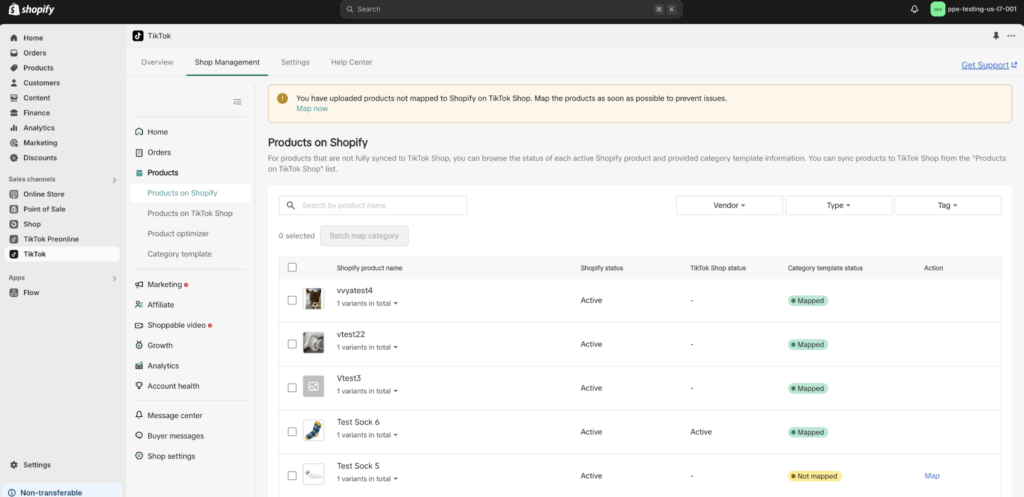
Many business owners might be quick to upload their entire Shopify product catalog to TikTok Shop. However, keep in mind that not every product will do well in the TikTok ecosystem, even if they perform well on Shopify.
Instead, prioritize listing TikTok-friendly products — ones that are easy to demonstrate use through video, considered trending novelty items, and/or have strong aesthetics. Avoid adding expensive, highly complex, overly niche, or visually dull items to your TikTok Shop.
4. Organize Your SKU and Inventory System
Before launching, it’s important to clean up your SKU and inventory system. This process should involve verifying variant structure, SKU naming consistency, inventory accuracy, and warehouse mapping.
If your SKU system isn’t well-organized, this can lead to stock syncing issues, duplicate listings, or even overselling.
5. Strengthen Your Backend Operations
Your fulfillment infrastructure, from storing products to handling returns, needs to be appropriately configured, especially before selling on a platform like TikTok Shop where sudden order spikes are likely.
Not to mention, compared to other eCommerce platforms, TikTok Shop consumers are more likely to make impulse purchases, leading to a higher-than-average return rate. That said, if your backend operations can’t handle a potential surge in sales or an uptick in returns, then adjustments will be necessary.
Potential weak spots in your fulfillment system might include a limited storage space or poor organization, insufficient staffing, slow processing times, limited carrier options, or heavy dependence on manual processes. Improving your backend operations can save headaches that may later come with expanding to a new eCommerce ecosystem.
6. Don’t Overcomplicate the Integrations
Adding extra automation tools or layers of software can create more harm than good when adding TikTok Shop to your line of retail channels. Think marketplace connectors, ERP integrations, ordering routing software, and feed management platforms.
The more complicated your setup becomes at the time of launch, the more potential issues you might run into, from troubleshooting delays to inventory mismatches. That said, it’s typically wiser to start out simple to ensure a stable setup before adding any necessary integrations later if your brand needs a more advanced system.
7. Run Test Orders Before Launching
Before you make your first actual sale on TikTok Shop, it’s important to run test orders. These tests ensure everything is running smoothly before officially going live.
These tests can help you determine that products were adequately synced to your shop and that the checkout process completes without error. It can also verify trouble-free order routing, that orders are assigned to the correct warehouse, that shipping labels were properly created, and that communications on the “customers’” end are timely and accurate, including the order confirmation email and any shipping or tracking updates.
8. Establish a Customer Support System
Quick customer support is always crucial. However, it’s even more important when operating on TikTok Shop, as your speed (or lack thereof) in resolving customer issues can hurt your performance on the platform. TikTok, on the other hand, rewards fast-responding sellers with increased shop visibility, which can lead to more sales.
Before activating your TikTok Shop, coming up with a solid customer support system is a must. Determine how you will handle lost or late packages, refund requests, and product complaints. A centralized support inbox can help keep multi-channel support tickets all in one place to keep customer support organized, and ensuring support agents have access to certain backend information like customers’ order history and tracking updates can ensure faster and smoother resolutions.
9. Stay on Top of Your TikTok Shop Account Health
Once you go live as a TikTok seller, it’s vital to upkeep your account health if you want to continue to do well on the platform, and more importantly, remain eligible to even sell on TikTok Shop.
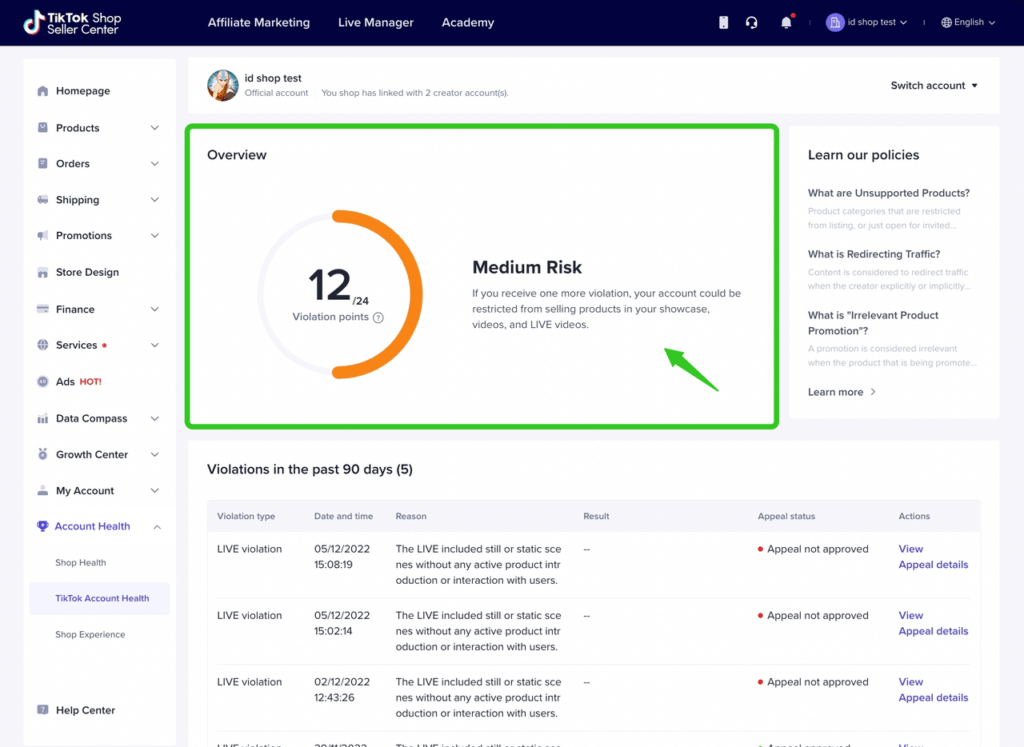
To remain in good standing, sellers must:
- Maintain low order cancellation/refund rates
- Respond promptly to customers
- Keep an accurate inventory
- Ship orders out quickly
- Ensure product listings are correct and not misleading
- Have good ratings overall
Poor TikTok Shop account health can otherwise lead to reduced visibility, lower conversion rates, selling limits or other restrictions, algorithm suppression, temporary suspensions, or even shop closure.
Need Assistance Syncing Your TikTok Shop with Shopify?
With the potential for costly setup mistakes and operational chaos, having an expert help you sync your TikTok Shop with your existing Shopify account can ensure a faster, cleaner launch.
Apart from helping you integrate your Shopify and TikTok Shop to ensure a smooth transition, Avenue Z can help simplify your TikTok Shop operations and boost sales for your brand. Solutions include, but are not limited to, affiliate marketing outreach, UGC creator content sourcing, organic content strategy, and TikTok advertisements.
Contact Avenue Z to find out more about their TikTok Shop services.
We Drive Influence
Win AI search, grow revenue and build reputation through PR and digital marketing.