On the same day as the launch of GPT-5.4, OpenAI also announced ChatGPT for Excel in beta. ChatGPT can appear directly in Excel to help users build, update, and analyze spreadsheets faster than ever. With less time needed for manual work, users can focus more on decision-making and execution.
What Can ChatGPT Do in Excel?
ChatGPT-5.4 appears right in your spreadsheets to assist analysts, strategists, researchers, accountants, and other roles with their manual tasks. Key features include:
- Building and Updating Faster – Instead of creating spreadsheets from scratch and manually analyzing them, users can describe what they need to ChatGPT, and the AI will update the Excel document accordingly.
- Getting Insights Across Large Projects – ChatGPT operates across workbooks to understand how every part of a spreadsheet connects. Using its insights, people can quickly learn about output changes, errors, and solutions without having to manually double check all the data.
- Offering Logic for Outputs – With every task, ChatGPT explains what it’s doing and references relevant cells and tabs. Users can easily verify the AI’s work to confirm that everything is consistent and accurate.
Catered to Financial Workflows
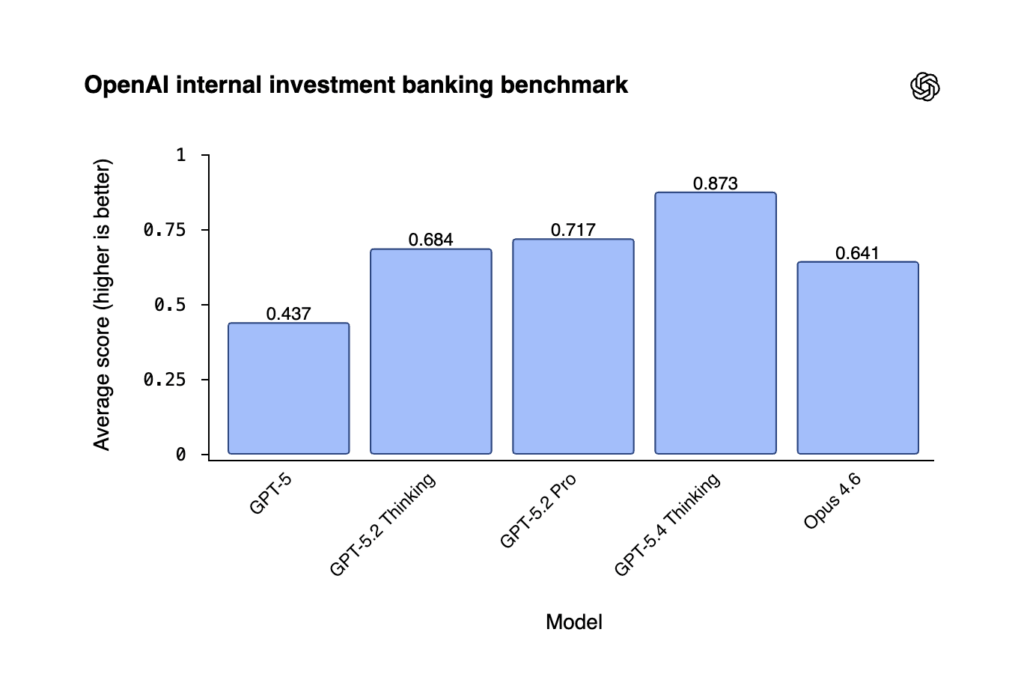
In Excel, ChatGPT works especially well for financial spreadsheets. It uses GPT-5.4, which is the best model for real-world financial tasks like financial modeling, scenario analysis, data extraction, and long-form research. On OpenAI’s internal investment banking benchmark, it scored an average of 0.873, which is higher than past ChatGPT models and Opus 4.6.
ChatGPT in Excel integrates apps like Moody’s, Dow Jones Factiva, MSCI, Third Bridge, and MT Newswires to keep all data in one place for added convenience. This can save users time by having the AI gather earnings summaries, valuation snapshots, credit memos, and other important information quickly.
How to Use ChatGPT for Excel
ChatGPT Business, Enterprise, Edu, Teachers, Pro, and Plus users in the U.S., Canada, and Australia can download ChatGPT for Excel in beta now. Access is off by default for Enterprise, Edu, and Teacher workspaces, but Admins can choose to turn it on or adjust permissions.
Since it’s still in beta, OpenAI is working hard to make updates based on user feedback. They’re still in the process of optimizing performance, so complex requests may take longer to generate than usual. ChatGPT will also be coming to Google Sheets soon.
Consider AI Assistance for Brand Strategies
AI can be a helpful tool for saving businesses time on manual tasks, and considering AI optimization in strategies can help brands gain visibility in online searches. However, since AI is constantly growing and changing, it can be difficult for some companies to keep up.
Need help taking advantage of AI to help your brand grow in revenue and reputation? Contact Avenue Z today to witness how our tailored tactics keep brands current and successful.
We are the Agency for Influence
Discover new ways to drive revenue and build reputation for your brand.